
What to Do When Google Won’t Take Down an Unfair Review
I see this situation constantly. A business owner opens their Google Business Profile, sees a brand-new one-star Google review, and immediately knows something feels wrong.
It could be a competitor, a former employee, a person who was never a customer, or someone who left feedback by accident. Either way, it feels unfair when your business name and reputation are on the line.
You follow the process, you report the review, and you wait. Then Google comes back and says they won’t remove reviews because the content does not violate their guidelines. When that happens, unfair Google reviews can feel overwhelming.
The truth is, when you understand what to do when Google won’t take down an unfair review, you still have control over what happens next.
Key Takeaways
- Even if Google won’t remove reviews, you can still control how your business is perceived by potential customers.
- Respond to negative reviews in a way that is direct, calm, and not defensive—an essential step in handling bad Google reviews while protecting your business reputation.
- Bury bad reviews quickly with a wave of positive reviews so they fall lower on the page.
- Set up review automation so reviews are built into your system instead of handled in a scramble.
- If you had hundreds of positive reviews, one unfair review would not hurt nearly as much.
Why Google Won’t Remove Reviews From Your Google Business Profile (The 20% Rule)
Before deciding what to do next, it’s important to understand how Google evaluates reviews. Google does not remove reviews simply because a business owner believes the feedback is wrong or unfair. For reviews removed, the content must clearly violate Google’s criteria, such as spam or policy violations.
You should still attempt to report the review through your Google Business Profile settings. This means going into your dashboard, finding the review, and filing a report. You can also ask others to check the review and file a report as well. Sometimes, strength in numbers helps surface a review that truly violates the rules.
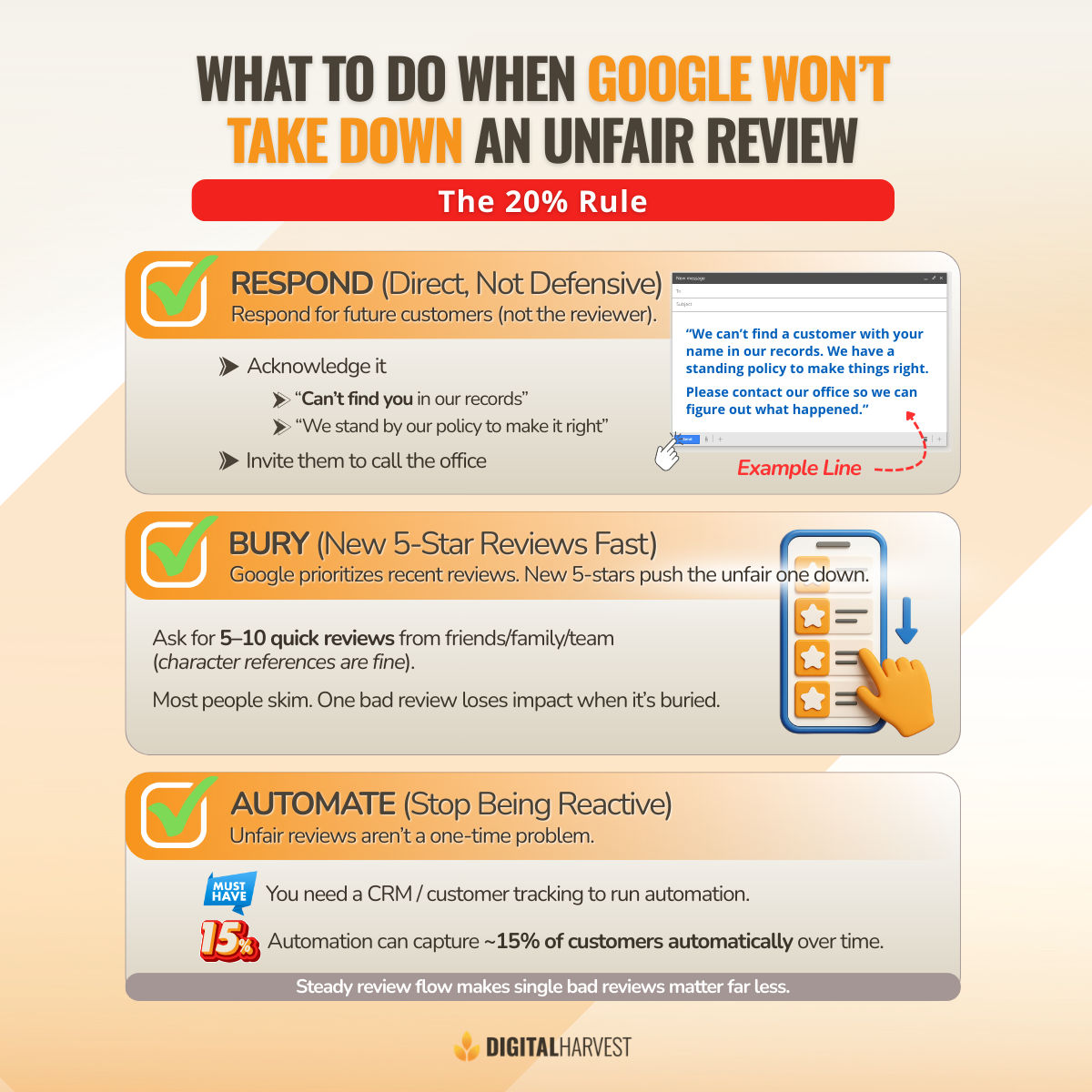
That said, expectations matter. In real-world scenarios, only about 20% of reviews are removed. Most negative feedback stays live because Google evaluates it as an opinion.
According to Google’s documentation on how to report inappropriate reviews, removal only happens when strict guidelines are violated.
When removal doesn’t happen, the focus needs to shift. Instead of worrying about what Google won’t do, you move on to what you can control.
Step 1: Respond to the Unfair Review (Direct, Not Defensive)
When Google won’t take down an unfair review, the first thing you should do is respond. This response is not really for the reviewer. It is for potential customers who are reading your reviews and trying to figure out whether to contact your business.
The goal of your response is to show that you are proactive, engaged, and willing to resolve issues. A calm response goes a long way with consumers and is often a sign of a business that genuinely cares about its customers.
If you cannot find the person in your system, it is okay to say that. Many unfair Google reviews come from someone who was never a customer. Stating that calmly helps people understand the situation without escalating it.
A strong response usually includes:
- Acknowledging the feedback so it doesn’t look ignored
- Explaining that you cannot find a customer with that name in your file
- Stating that you have a standing policy to make things right
- Inviting the person to contact your office directly
Example language you can use or adapt:
- “We can’t find a customer with your name anywhere in our records.”
- “We have a standing policy to do everything we can to make things right.”
- “Please contact our office so we can talk and figure out what happened.”
If the review has no details at all, it’s also fair to say you’re not sure what it’s in reference to. That single line of context helps readers understand what’s going on and shows that you’re listening.
If you don’t want to overthink your response, using ChatGPT as a drafting tool can help you set the tone, review a few options, and choose the best one before posting.
For more examples, Digital Harvest walks through this approach in tips for handling negative reviews professionally and effectively.
Step 2: Bury the Unfair Review Fast with New 5-Stars
Once you’ve responded, the next step is to bury the unfair review as quickly as possible.

“Bury the negative review immediately, bury it with a ton of five stars that people have to scroll down to go see this unfair review.”
Google prioritizes recent reviews. That means when new positive reviews come in, older negative reviews fall further down the page. Timing matters here.
Friends, family, and team members can help by leaving character reference reviews, even if they haven’t done business with you directly. These reviews act as a sign of goodwill and show that people are grateful for how you operate as a business.
Most consumers skim reviews instead of reading every single one. When they see a strong group of positive reviews tied to your business name, one negative opinion loses its impact.
A realistic target is five to ten new reviews quickly. That is often enough to push the unfair review down so it’s no longer front and center.
Step 3: Set Up Review Automation
This is the part most business owners miss. Unfair reviews are not a one-time problem. They are part of doing business today.
Many business owners don’t have a CRM or a clear way to track customers and jobs. Without that, it’s impossible to set up review automation or know who to follow up with.
With automation in place, you can expect at least 15% of customers to leave a review automatically. Over time, this steady flow of reviews makes individual bad reviews matter far less.
This also requires a mindset shift. Reviews need to be part of the process, not something you only think about when something goes wrong. When reviews are built into your system, you’re prepared instead of reactive.
If you want to see what this looks like in practice, Digital Harvest walks through the full system in our guide on how to automate your customer review process.
Turn This Into a Better System Going Forward
When Google won’t take down an unfair review, this won’t be the last time it happens. Google isn’t suddenly going to change how reviews work.
But this can be the first time you take control of the process.
Respond directly and professionally. Bury the unfair review with positive reviews. Then put automation in place so you’re proactive instead of reactive.
Unfair reviews don’t stop on their own. If you want help putting a system in place before the next one hits, you can contact Digital Harvest by filling out our contact form, calling us directly at (505) 365-1545, or book a time directly on my calendar. I can walk you through the system, answer questions, and show you exactly how to handle this moving forward.
Frequently Asked Questions About Google Reviews
Why won’t Google remove an unfair review?
Google does not remove reviews simply because they feel unfair to the business owner. For reviews removed, Google looks at whether the review violates specific guidelines, such as spam, irrelevant content, or conflicts of interest.
If the feedback is evaluated as a personal opinion, it usually stays live, even when it feels wrong. This is why many unfair Google reviews remain on a Google Business Profile.
Can I remove reviews if the person was never a customer?
Sometimes, but not always. If the reviewer was never a customer and the review clearly violates Google’s criteria, such as spam or fake engagement, you can report it and attempt to have it removed.
However, Google often keeps reviews live if it cannot clearly confirm a violation. This is why responding and building more positive reviews is usually more effective than focusing only on removal.
What should I write in a response to a fake or competitor Google review?
Your response should be calm, direct, and professional. You can explain that you cannot find the person in your records, state that you have a standing policy to resolve issues, and invite the reviewer to contact your business directly. This type of response helps potential customers understand the situation and builds trust, even when the review itself is unfair.
Does flagging a review multiple times help get it removed?
Flagging a review multiple times can help in some cases, especially if the review violates guidelines. Asking friends, family, or coworkers to report it can increase visibility. That said, only a small percentage of reviews are actually removed, so it’s important to move forward with a plan even if Google does not take action.
How many positive reviews do I need to bury a one-star review?
In most cases, five to ten new positive reviews are enough to push a negative review down so it is no longer the first thing people see. Many consumers skim reviews rather than reading every line. When they see strong, consistent positive feedback tied to your business name, one bad review has far less impact on new customers.
How can I reach Digital Harvest for help with Google reviews?
If you want help responding to unfair Google reviews or setting up a better review system, you can reach Digital Harvest directly. You can call our office at (505) 365-1545 to talk with someone from our team, or you can fill out the contact form on our website to request a call.
Once you reach out, we’ll listen to your situation, answer your questions, and explain the next steps clearly so you can decide what makes sense for your business.