
Fake Review or Competitor Attack? How to Flag a Fake Google Review the Right Way
Somebody just left you a fake Google review. It could be a competitor, a disgruntled employee, or a user you’ve never heard of. For any business owner, that moment is frustrating because your ratings, online reputation, and potential customers are all affected at once.
In this guide, I’ll show you exactly how to flag a fake Google review using Google’s interface the right way—an important step in managing negative reviews and protecting your business’s online reputation. I’ll also walk you through what to do after you report the review, so you still look professional and reliable even if Google takes time to act.
This process helps small businesses protect their business profile, maintain trust, and avoid letting fake reviews derail their focus.
Key Takeaways
- Fake reviews should be reported directly inside your Google Business Profile using the “Report review” option.
- The most relevant report reasons are spam, competitor activity, or inappropriate content.
- Using multiple Google accounts to report the same review can improve the chance of removal.
- Responding publicly and responding promptly helps protect your reputation with most people who read reviews.
- Positive reviews and automation help prevent one fake review from impacting more customers or future business.
First, Confirm What You’re Looking At (Fake Review, Competitor, or Disgruntled Employee)
Before you report anything, you need to confirm what kind of review you’re dealing with. Fake reviews can show up in several ways, and choosing the right context matters for the reporting process.
In many cases, the reviewer is not in your system at all. You check your records, your client list, and your account history, and there is no match. Other times, the review looks suspicious and may be tied to a competitor, especially if it references services you don’t offer or pricing that doesn’t apply.
Another common example is a disgruntled employee. These reviews are often written after something happened internally and have nothing to do with actual customer service. Google may remove these if they violate content policies or are clearly inappropriate.
The reality is that Google’s removal process is inconsistent. Sometimes reviews that make no sense stay live, and other times reviews get removed unexpectedly. Your job is to select the most relevant reason so Google can properly evaluate the situation. Google outlines this review fraud and reporting criteria in its guide on how to report inappropriate reviews.
How to Flag a Fake Google Review in Google’s Interface (Step-by-Step)
Step 1: Open the Review List in Your Google Dashboard
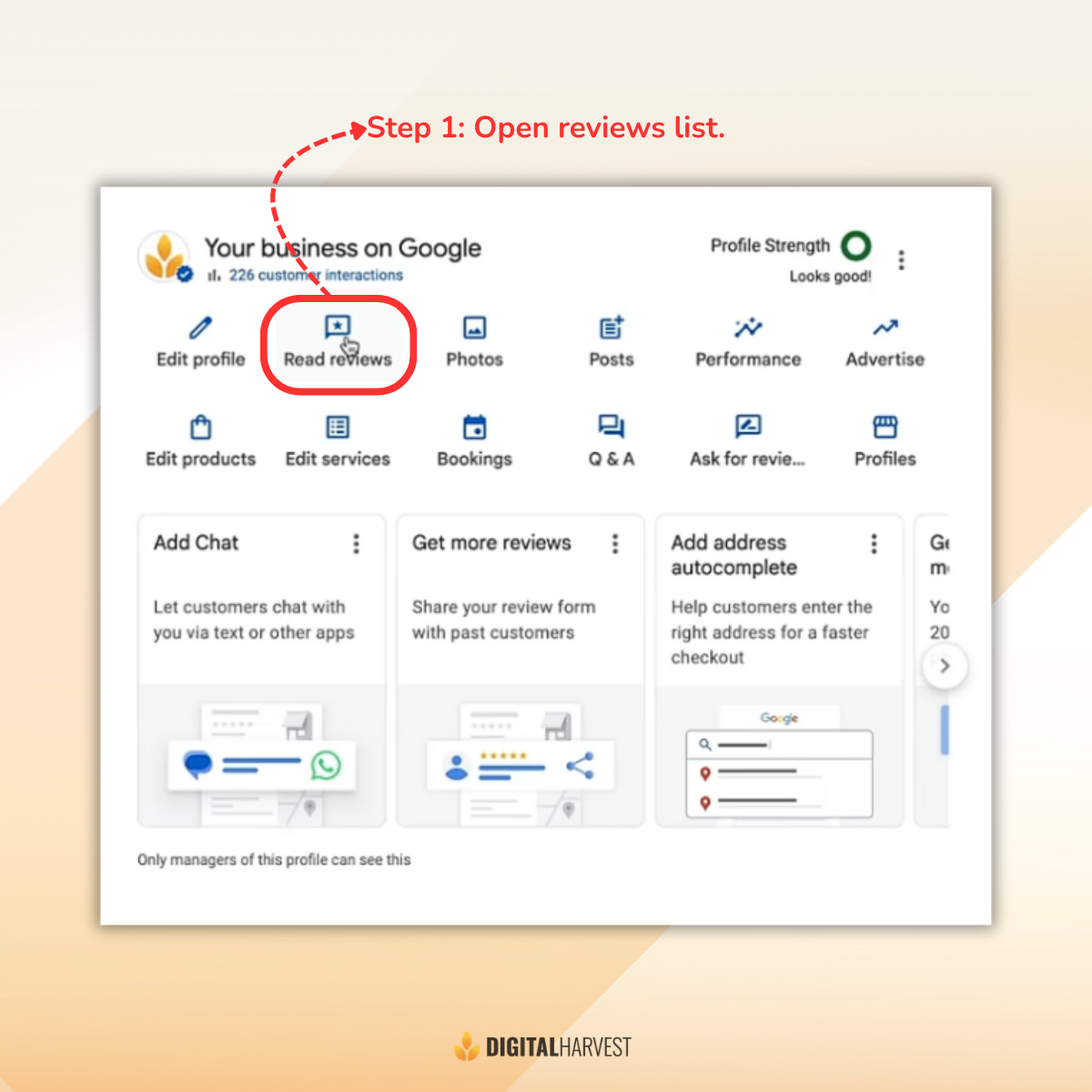
Log in to the Google account that manages your business profile. From the dashboard, locate your business and tap Read reviews. This opens your list of online reviews, including ratings, user names, and dates.
This is where you manage reviews, respond publicly, and locate the specific Google review you want to flag. Make sure you’re logged into the correct account so you can submit reports properly.
Step 2: Click “Report Review” and Choose the Best-Fit Reason

Next to the review, click the three dots menu. Select the Report review. Google will show several report options.
For fake reviews, the most common and relevant options are spam or competitor. If the review is fake and you don’t recognize the customer, mark it as spam. If you suspect it was written by a competitor or someone involved with another company, choose that option. Disgruntled employee reviews can also be reported when they are inappropriate.
Avoid overthinking this step. Pick the reason that best matches what happened and move forward. You can add additional information if prompted, but the key is selecting the correct category.
Step 3: Submit the Report and Understand What Happens Next
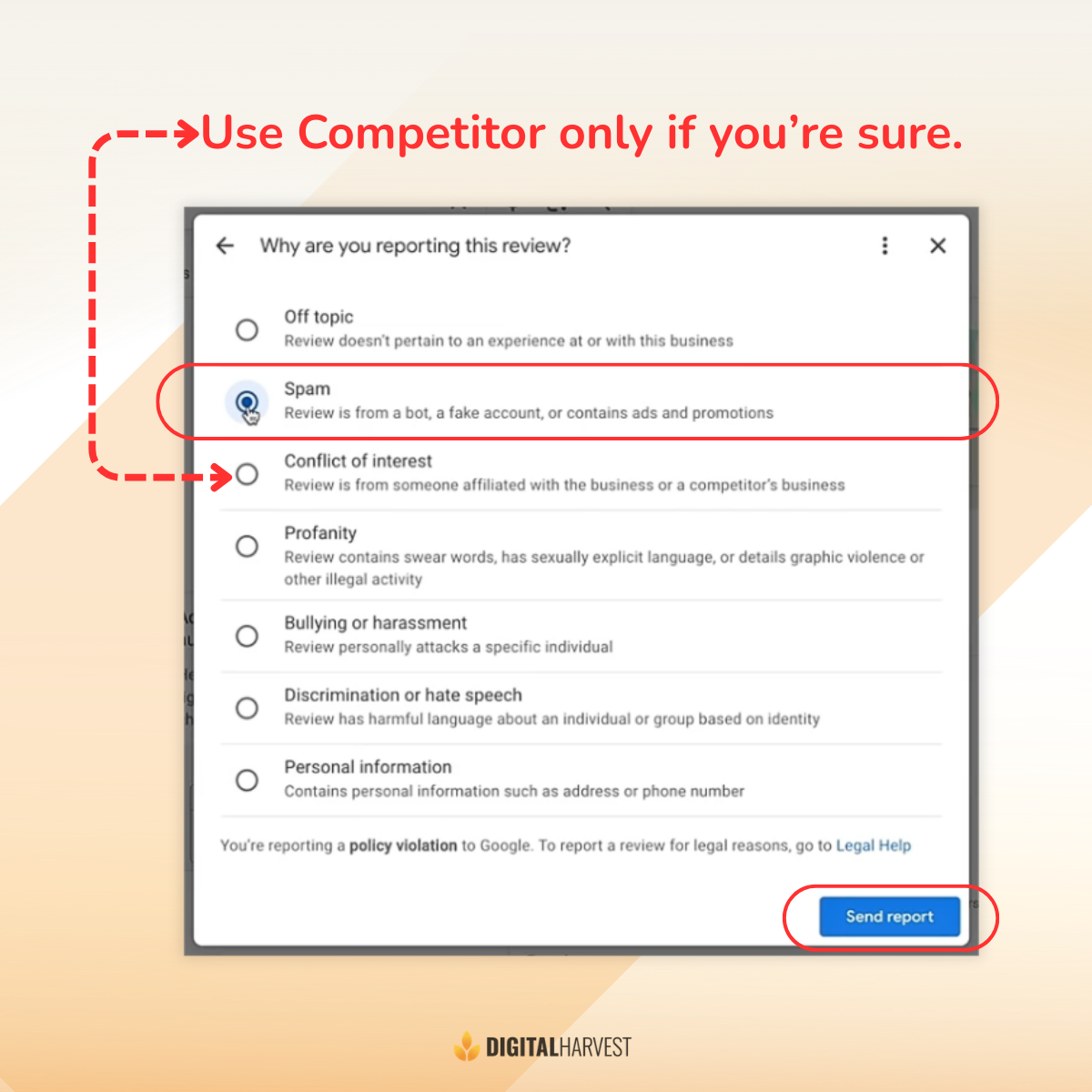
Once you select the reason, click Submit. At that point, the report is sent to Google for review. You may not receive a confirmation beyond submission, and removal is not guaranteed.
This is where many business owners get stuck waiting. Google may accept the report and remove the review, or they may leave it live. That uncertainty is exactly why what you do next matters just as much as the report itself.
Step 4: “Strength in Numbers” Follow-up Reporting
To increase your odds, you can ask others to report the same review. Team members, colleagues, friends, or family can report it from their own Google accounts.
Multiple reports from different users and IP addresses help signal that something suspicious may be happening. While this does not guarantee removal, it gives Google additional evidence to evaluate. For more guidance on handling this professionally, Digital Harvest shares advice on handling negative reviews effectively.

What to Do After You Report It (Because You Don’t Know if Google Will Remove It)
After you submit the report, you still need to take action. Waiting for Google to fix it is not a strategy.
The mindset here is staying proactive. You don’t know if Google will accept the report, so you focus on protecting your reputation and maintaining trust with potential customers.
The next moves are responding publicly, adding positive reviews to push the fake one down, and setting up systems so this doesn’t keep happening.
Tip #1 After Reporting: Respond Without Looking Defensive (But Still Direct)
Your response serves two purposes. It shows the review may be fake, and it shows your business is professional and responsive.
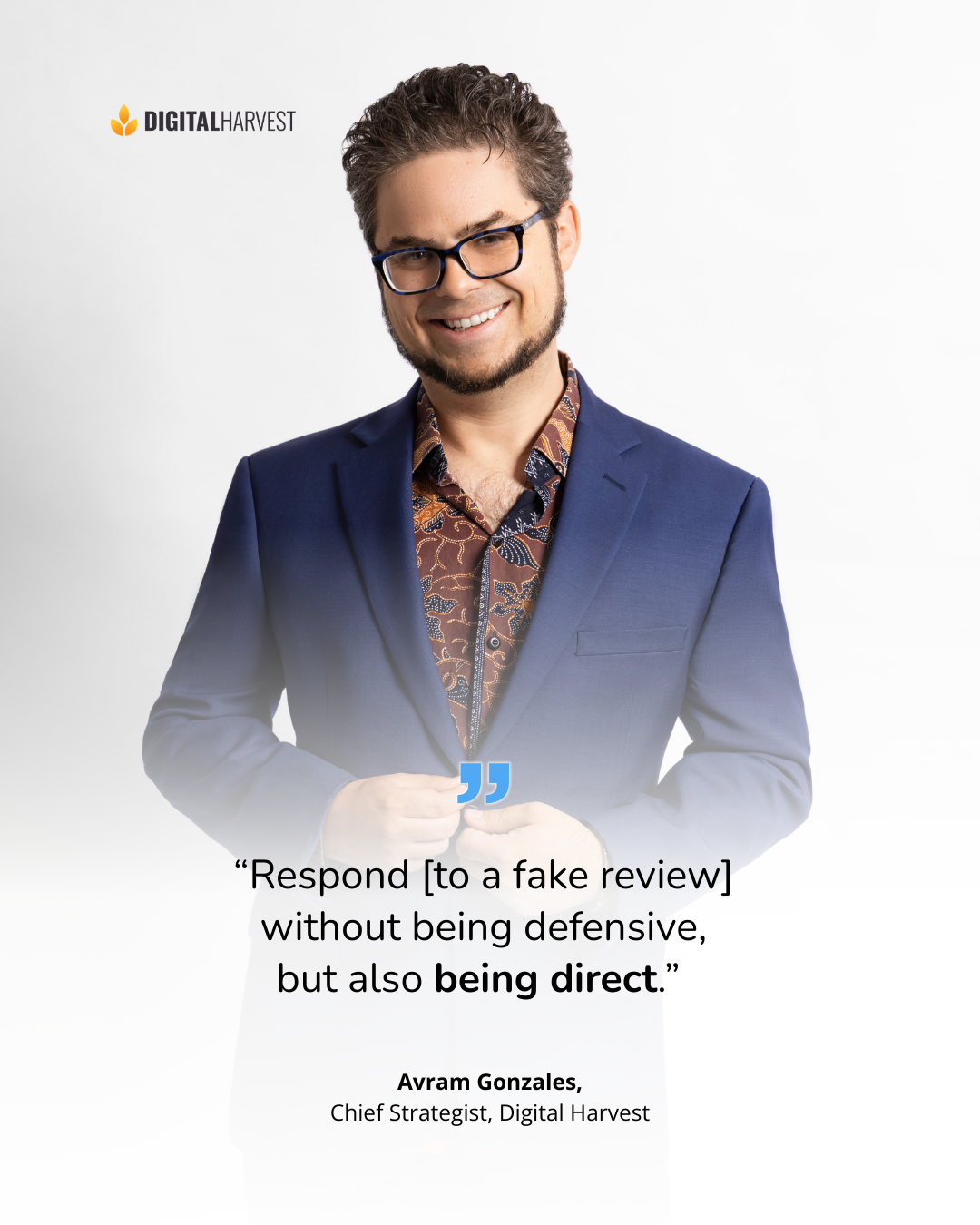
"Respond [to a fake review] without being defensive, but also being direct."
If the reviewer is not in your records, say so. Invite them to contact your office to address the issue. Keep the response short so it doesn’t read as panic or frustration. Responding promptly helps future readers understand the context and see that your business takes feedback seriously.
Tip #2 After Reporting: Bury the Review Fast with 5-Star Character References
Next, work on burying the review. The goal is to push the negative review further down so it’s less visible when most people skim ratings.
Friends and family can leave five-star reviews as character references, even if they haven’t used your services directly. Most people scan reviews rather than filtering for one-star ratings, so positive reviews help shape perception.
Google also explains best practices for requesting reviews in its guide on getting more reviews.
Tip #3 After Reporting: Automate Review Requests So One Attack Doesn’t Control Your Mood
If you haven’t automated review requests, do it immediately. About 15% of customers respond to automated requests, which adds up over time.
The biggest blocker is no CRM or system to track customers. Without that, automation isn’t possible. This is not just technology, it’s mindset. With 500 positive reviews, one fake review doesn’t have the same impact it does at 50.
Digital Harvest breaks this down in how to automate your customer review process.
Keep Your Cool, Then Work the Process
Here’s the process in order:
- Flag the review correctly inside Google.
- Increase your odds by having multiple people report the same review.
- Respond publicly in a direct, calm way that doesn’t sound defensive.
- Bury the review with new positive reviews.
- Automate review requests so you’re proactive long term.
Fake reviews don’t fix themselves. If you want help with reviews, systems, and training before the next one hits, contact Digital Harvest, call us at (505) 365-1545, or book a schedule on my calendar. My team and I help businesses stay in control of their online reputation.
Frequently Asked Questions
How do I report a fake Google review on my business profile?
To report a fake Google review, log into your Google Business Profile and open the Read reviews section. Locate the review, click the three dots, and select Report review. Choose the reason that best fits, such as spam or competitor, then submit it for Google to evaluate.
This process sends the review to Google’s system for review, but removal is not guaranteed. That’s why reporting is only the first part of protecting your online reputation.
What reason should I choose when reporting a competitor’s Google review?
If you suspect the review came from a competitor, select the competitor option when you report the review. This gives Google important context when they evaluate whether the review violates content policies.
If the reviewer is not a customer and appears tied to another business, this is the most relevant choice. Picking the correct reason helps Google understand why the review may be inappropriate. Avoid choosing categories that don’t clearly match the situation.
How long does it take Google to remove a reported review?
There is no guaranteed timeline for review removal. Sometimes Google acts quickly, and other times a fake review stays live even when it clearly feels wrong. Google evaluates each report based on its guidelines, criteria, and internal review process.
This uncertainty is why business owners should stay proactive instead of waiting. You should always assume the review may stay up and plan accordingly.
Should I respond to a fake Google review or ignore it?
You should respond publicly to a fake review in a calm, direct way. Responding shows potential customers that your business listens and takes feedback seriously, even when the review is unfair.
If the reviewer is not in your system, it’s okay to say that and invite them to contact your office. Keep the response short so it doesn’t look defensive. This approach helps protect your reputation while Google reviews the report.
Can friends and employees report the same fake review to help get it removed?
Yes, having multiple people report the same fake review can help. Friends, family, team members, or colleagues can report it from their own Google accounts, which may increase the chance Google takes it seriously.
Reports coming from different users and IP addresses provide additional signals to Google’s system. While this does not guarantee removal, it improves the odds. You should still follow up by responding publicly and burying the review with positive reviews.
How can I contact Digital Harvest for help with fake Google reviews?
If you want help dealing with fake Google reviews or setting up a better review system, you can contact Digital Harvest directly. You can call us at (505) 365-1545 to speak with Avram, our Chief Strategist, or fill out the contact form on our website to request a call.
We’ll review your situation, answer your questions, and explain what steps make the most sense for your business. This makes it easier to move forward with a plan instead of reacting every time a review shows up.