
How to Read and Interpret Your Google LSA Reports
If you're investing money into Google Local Service Ads, your reporting dashboard should help you understand whether that investment is generating quality leads and a good return on investment.
The challenge is that Google LSA reports are intentionally limited. Unlike Google Analytics or traditional Google Ads reports, Local Services reporting focuses on a small set of metrics rather than overwhelming business owners with charts, traffic data, or complex conversion tracking.
That's actually a good thing, provided you know what you're looking at.
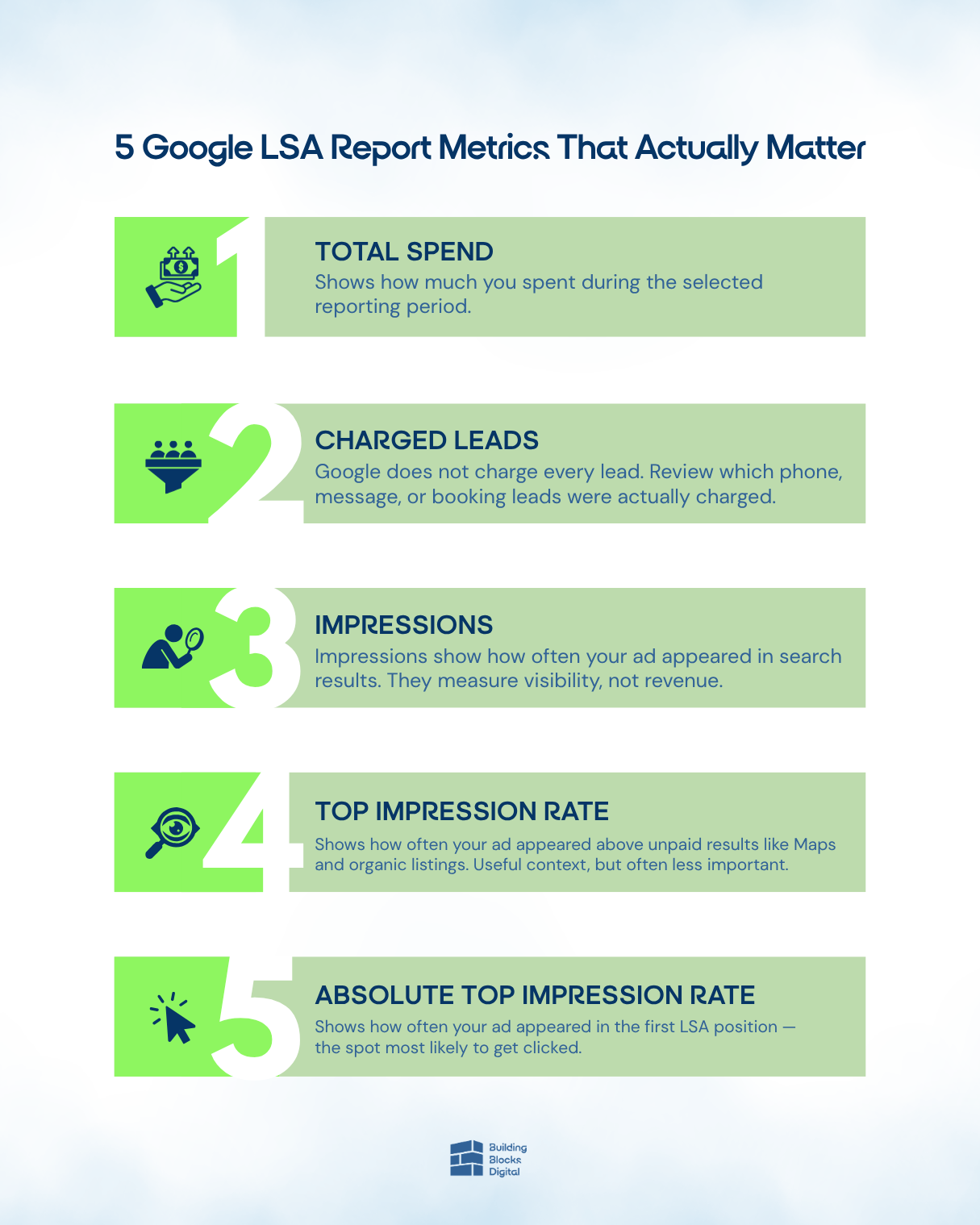
In this article, I'll show you how to read and interpret your Google LSA reports, what each metric means, and which numbers deserve your attention. We'll cover ad spend, charged leads, impressions, top impression rate, absolute top impression rate, and what to do when performance starts slipping.
Key Takeaways
- Google Local Service Ads reports are intentionally simple advertising reports designed to highlight the metrics that matter most.
- The dashboard shows total spend, lead types, charged leads, impressions, top impression rate, and absolute top impression rate.
- Impressions measure how often your ads appeared in Google search results during the selected time period.
- Top impression rate shows whether your Local Services ads appeared above unpaid results.
- Absolute top impression rate is the most important visibility metric because it measures how often your ad appears in the number-one position.
- Reviewing Google LSA reports regularly helps identify opportunities to improve lead quality, conversion rate, and overall business performance.
Start by Selecting the Right Time Range in Your Google Local Service Ads Reports
Before you analyze any data inside your account, start by selecting the right time range.
This is the first thing I look at whenever I open a Google Local Service Ads report because every metric in the dashboard is affected by the date range selected.
A seven-day report can help you identify recent changes in lead flow, ad spend, and account performance. A 30-day report often provides a clearer picture of trends and overall efficiency.
If you're not careful, the wrong date range can make your results look better or worse than they really are.
Google notes in its Local Services reporting documentation that reports include spend, charged leads, lead credits, and performance data across different lead types.
Before making decisions about your budget, campaigns, or marketing strategy, make sure the selected date range matches the question you're trying to answer.
Understand Ad Spend, Lead Types, and Charged Leads First
The most obvious section of any Google LSA report is the spend section.
This area shows the total amount you've spent during the selected period and breaks that spend down by lead type.
Typically, you'll see:
- Phone leads
- Message leads
- Booking leads
This information helps you understand where your advertising dollars are going and which lead sources are generating activity.
One of the most important things to understand is that Google does not charge you for every lead that comes through the platform.
Google reviews incoming leads and attempts to determine whether they meet its standards for a valid lead. Because of this grading process, not every lead becomes a charged lead.
That's why I always tell business owners to look beyond total spend.
The real questions are:
- How much did we spend?
- Which lead types created that spend?
- How many charged leads did we receive?
- Are there leads we should dispute or review?
The answers provide far more useful conversion data than simply looking at cost alone.
A high ad spend number doesn't necessarily indicate poor performance. Likewise, a low spend number doesn't automatically mean success.
You need to understand how much revenue was generated, how many leads were generated, and whether those leads turned into paying customers.
If you are not grading your Google LSA leads, you could be making decisions based on incomplete data.
Know What Impressions Mean in Google Ads Reports and Local Services Reporting
The next metric you'll see is impressions.
An impression occurs every time your ad appears in a search result during the selected reporting period.
“Every single time your ad appears in a search result during the selected reporting period, Google counts it as an impression.”
For example, if someone searches for an HVAC contractor in your local market and your Google Local Service Ads listing appears at the top of the page, that appearance counts as an impression.
If two advertisers appear in the Local Services section, both advertisers receive an impression.
Impressions help measure visibility, but they are not conversions.
They do not represent:
- Phone calls
- Messages
- Booked jobs
- Conversion actions
- Customers
- Revenue
Think of impressions as the foundation of your reporting system. They tell you how often your business is visible to potential customers.
High impressions can indicate strong visibility, but they should always be evaluated alongside charged leads, conversion value, and absolute top impression rate.
Impressions matter, but they are not the primary success metric in Google Local Service Ads.
Do Not Overvalue Top Impression Rate in Your Advertising Reports
The next metric business owners often ask about is top impression rate.
Top impression rate measures the percentage of impressions that appeared above unpaid search results.
In practical terms, that means your ad appeared before Google Maps results and before traditional organic website listings.
In the example from my video, the account showed a 93% top impression rate.
That means the ad appeared above unpaid results 93% of the time.
While that sounds impressive, I generally don't spend much time analyzing this number.
The reason is simple.
Most Google Local Service Ads already appear above organic search results. In many client accounts, top impression rate is already 90% or higher.
Because of that, this metric often doesn't tell us much about why an account is succeeding or struggling.
It provides useful context, but it is not the visibility metric I focus on most.
The more important metric is absolute top impression rate.
Focus on Absolute Top Impression Rate to Improve Conversion Value and LSA Performance
If there's one metric I want business owners to focus on inside their Google Local Service Ads reports, it's absolute top impression rate.
This is the real key.
Absolute top impression rate shows how often your ad appeared in the very first position within the Local Services Ads section.
If your report shows an absolute top impression rate of 12.39%, that means that out of every 100 impressions, your ad appeared in the number-one spot roughly 12 or 13 times.
Why does this matter?
Because a large percentage of searchers click the first result they see. Many potential customers never scroll, compare providers, or analyze multiple options. They simply click the first business that appears.
“The absolute top impression is really where you want to be as much as possible because many searchers simply click the first result they see.”
One thing that makes Google Local Service Ads different from traditional Google Ads campaigns is how billing works. Google doesn't charge you simply because your ad was visible. It doesn't charge you for impressions. It doesn't even charge you just because someone clicked.
Instead, you typically pay when an interaction becomes an actual lead.
That distinction matters because improving your absolute top impression rate can increase leads generated without necessarily increasing your ad spend. If you're already receiving impressions, moving into the first position more often can create additional opportunities from the same search demand.
When I review advertising reports, a low absolute top impression rate usually tells me the account is visible but not winning enough premium placements. A stronger percentage indicates the account is competing more effectively for the most valuable position on the page.
If you're trying to improve lead flow, conversion value, and overall marketing efficiency, this is one of the most important metrics to watch.
For additional guidance, explore these resources from Building Blocks Digital:
What to Fix When Absolute Top Impression Rate Is Weak
The next question I usually hear is simple: What should you do if your absolute top impression rate is low?
In my experience, a weak percentage is often a symptom of operational problems rather than a reporting problem.
Several factors influence how well your Google Local Service Ads account performs:
- How quickly you answer the phone
- Whether calls go to voicemail
- How quickly you respond to leads
- How your team handles incoming opportunities
- Whether those calls result in booked jobs
- Review velocity over time
Call handling is especially important.
Google is paying attention to how businesses interact with customers. The experience a user has when they call your company can influence future opportunities and overall account performance.
If your dispatch team consistently answers calls, follows a process, and turns inquiries into appointments, that's a positive signal.
Review velocity is another major ranking factor.
The number of reviews your business earns over time affects trust, visibility, and your ability to compete in the Local Services section. Businesses that consistently generate reviews often perform better than businesses that only receive reviews sporadically.
Google also recommends encouraging reviews, maximizing leads through bidding strategies, using quality photos, and maintaining accurate service areas and job types.
At Building Blocks Digital, we've found that responsiveness, availability, reviews, budget allocation, and lead quality all contribute to stronger performance.
A weak absolute top impression rate is rarely an isolated metric issue. It often points toward business processes, trust signals, and customer experience factors that need attention.
Review Google LSA Reports Monthly to Improve Conversion Data and Lead Quality
I recommend reviewing your Google Local Service Ads reports at least once per month.
If you're actively managing growth, increasing your advertising budget, or trying to improve efficiency, a weekly review is even better.
When I analyze reports, I'm looking at:
- Total spend
- Charged leads
- Lead type breakdowns
- Impressions
- Top impression rate
- Absolute top impression rate
These metrics help identify trends before they become expensive problems.
For example, if leads generated suddenly decline but search demand remains consistent, the issue may be related to call handling, availability, reviews, or account settings.
If ad spend increases while lead volume decreases, that may indicate a problem that requires further analysis.
The goal isn't simply to review data for the sake of reviewing data.
The goal is to use reporting to make better decisions, improve conversion rates, optimize your investment, and create a more predictable lead flow.
Regular monitoring gives you more control over performance and helps reduce the risk of small problems becoming larger ones.
Use Google Local Service Ads Reports to Improve Business Performance
At the end of the day, your Google LSA reports should help you improve performance, not just provide numbers. The real value comes from what you do with the information presented above.
When you use the metrics to improve call handling, response speed, review velocity, lead quality, and customer experience, your account becomes more effective over time.
If you want a complete walkthrough of setting up, maintaining, launching, and troubleshooting Google Local Service Ads, download our free Get HVAC Leads Now course.
If you'd like help making sense of your reports, explore our Google Local Service Ads Services, learn more about our Google Analytics & Reporting services, give us a call at (505) 365-1545, or book time directly on my calendar.
My team and I will review your account, identify what's holding performance back, and help you generate more high-intent leads from Google Local Service Ads.
Frequently Asked Questions
How do I read my Google Local Service Ads reports?
Start by selecting the correct date range in your Google Local Service Ads account. Then review the core metrics in this order: total spend, lead type breakdown, charged leads, impressions, top impression rate, and absolute top impression rate.
What is an impression in Google Local Service Ads?
An impression occurs every time your ad appears in Google search results. An impression does not mean a customer called, sent a message, booked a job, or completed a conversion action. Think of impressions as the baseline metric that shows how often your business is visible to potential customers in your local market.
What is absolute top impression rate in Local Service Ads?
Absolute top impression rate measures the percentage of impressions where your ad appears in the number-one position. For example, if your report shows an absolute top impression rate of 12%, your ad appeared first about 12 times out of every 100 impressions.
Why is my Google LSA absolute top impression rate low?
A low absolute top impression rate can be caused by several factors. Common issues include missed phone calls, slow response times, poor lead handling, inconsistent business hours, weak review velocity, or insufficient budget.
Google's system evaluates multiple trust and performance signals when determining ad placement, so improving responsiveness and customer experience can often improve visibility over time.
Does Google charge for every lead in Local Services Ads?
No. Google reviews incoming leads and attempts to determine whether they are valid. Because of this process, not every lead becomes a charged lead. Your reports will show both activity and charged leads, which is why it's important to review lead quality regularly and dispute invalid leads when appropriate.
Which metric matters most in Google Local Service Ads reports?
If I could only look at one visibility metric, it would be absolute top impression rate.
Impressions tell you how often your ads appear, and top impression rate shows whether they appear above unpaid results.
However, absolute top impression rate tells you how often you're winning the number-one position, which typically has the greatest impact on lead flow and overall performance.
How often should I review my Google LSA reports?
I recommend reviewing your reports at least monthly. If you're actively managing ad spend, monitoring trends, or troubleshooting performance issues, a weekly review is even better. Regular analysis helps you identify problems before they affect leads, revenue generated, and overall marketing efficiency.
How can I contact Building Blocks Digital for help interpreting my LSA reports?
If you'd like help understanding your Google Local Service Ads data, improving lead quality, or increasing your absolute top impression rate, you can schedule a strategy call with me and my team at Building Blocks Digital.